


3 mins

ASUS has officially announced the ROG XG Station 3, an external graphics card dock that connects to a laptop over Thunderbolt 5 and can hold desktop cards up to the GeForce RTX 5090. Here is what was announced, what it can and can't do, and whether it makes more sense than a dedicated gaming PC.
What is the ROG XG Station 3?
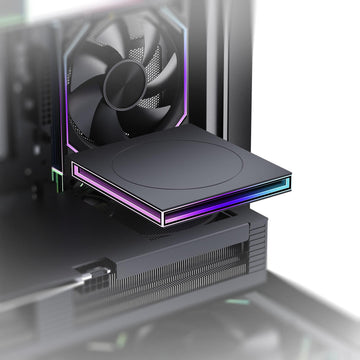
According to the official ASUS press release dated November 3, 2026, the XG Station 3 is an open-frame dock that holds a full desktop graphics card and links it to a laptop with a single Thunderbolt 5 cable. ASUS lists support for the NVIDIA GeForce RTX 50 Series, RTX PRO 6000 Series, AMD Radeon RX 9000 Series and Intel Arc Series.
VideoCardz notes that ASUS first demonstrated the dock at Computex 2025 and showed it again in May, so this announcement mainly adds connectivity and compatibility details. TechPowerUp and Windows Report also covered the launch. Since this is ASUS's own announcement, the details below come straight from the company.
Does the ROG XG Station 3 really support the RTX 5090?
Yes, on paper. The dock has an integrated GC-HPWR slot for ASUS BTF 2.5 graphics cards, and ASUS names the ROG Astral GeForce RTX 5090 BTF Edition and the TUF Gaming GeForce RTX 5080 BTF OC Edition as examples. BTF cards draw power through that slot, so no PCIe power cable is visible. Standard graphics cards also work, using regular PCIe power cables.
There are two practical limits. First, the dock does not include a power supply: VideoCardz reports that ASUS requires you to install your own SFX or SFX-L PSU with enough capacity for your card. Second, the card has to fit, and the maximum supported size is 361 × 139.3 × 93.9 mm.
How fast is Thunderbolt 5 for an external GPU?
ASUS quotes up to 80 Gbps of bidirectional bandwidth, twice that of Thunderbolt 4, and up to 120 Gbps with Thunderbolt 5 Bandwidth Boost for display traffic. VideoCardz points out an important caveat: Thunderbolt 5 still limits PCIe tunneling to 64 Gbps. That is roughly the bandwidth of four PCIe 4.0 lanes, while a desktop motherboard gives a graphics card a full x16 slot.
In practice, expect a high-end card in this dock to perform below the same card inside a desktop, with the gap depending on the game, the laptop and the connection. ASUS has not published performance numbers for the dock. Thunderbolt 4 laptops are supported too, but at lower connection speeds.
What else does the ROG XG Station 3 do?
- A Thunderbolt 5 upstream port with up to 140 W of USB Power Delivery to charge the laptop over the same cable.
- A Thunderbolt 5 downstream port that supports up to three 4K displays through daisy chaining and provides up to 36 W of charging.
- Two front USB-C 10 Gbps ports for gaming gear and external storage.
- Aura Sync RGB lighting and an open design that gives the graphics card unobstructed airflow.
The graphics card's own video outputs remain available for your monitors as well.
What is the ROG XG Station 3 price and release date?
ASUS's announcement does not give a price or a release date, and neither VideoCardz nor TechPowerUp reported one. The ROG XG Station 3 product page is live on the ROG website. Keep in mind that the dock is only part of the bill: you still need a graphics card and an SFX power supply, and high-end cards are hard to find right now. We recently covered the RTX 5090 supply situation.
Should you buy an eGPU dock or a gaming PC?
An eGPU dock makes sense if you already own a recent Thunderbolt 5 laptop, carry it around, and want that same machine to become a desktop-class gaming or creative setup at your desk.
If you mostly play at home, a desktop is usually the simpler choice: the graphics card gets a full PCIe x16 link, the power supply and cooling are built in, and upgrades are straightforward. Our advice: wait for ASUS's price and independent reviews before buying the XG Station 3. If you want strong performance now, browse our gaming PCs, compare graphics cards, or look at our refurbished PCs for a lower-cost option.
FAQ
Does the ROG XG Station 3 include a power supply?
No. ASUS requires a separate SFX or SFX-L power supply with enough capacity for your graphics card.
Does the ROG XG Station 3 work with Thunderbolt 4 laptops?
Yes. It is backward compatible with Thunderbolt 4, but those laptops connect at lower speeds.
Which graphics cards fit in the ROG XG Station 3?
ASUS lists GeForce RTX 50, RTX PRO 6000, Radeon RX 9000 and Intel Arc cards up to 361 × 139.3 × 93.9 mm, including BTF 2.5 cards through the GC-HPWR slot.
Is an external GPU as fast as the same card in a desktop?
Generally not, because Thunderbolt 5 limits PCIe tunneling to 64 Gbps. ASUS has not shared benchmarks yet, so wait for independent tests.
Sources: ASUS Pressroom, ROG product page, VideoCardz, TechPowerUp, Windows Report, and posts by VideoCardz and TechPowerUp on X. Image: ASUS official press image.


