
4 mins

Pulsar Feinmann F01 Noctua Edition price: lightweight mouse with real palm cooling
Cooling your mouse hand isn’t a meme anymore. If you’ve been hunting for the Pulsar Feinmann F01 Noctua Edition price, it lands at US$179.95, and the mouse is shipping now with a built‑in Noctua NF‑A4x10 fan, 8K wireless polling, and a 73 g chassis.
Designed jointly by Pulsar and Noctua, this F01 variant blends active airflow with a modern esports sensor and optical switches. It’s a timely idea for summer heat waves and for players who grind long FPS sessions where a steady, dry grip matters.
Quick Summary
- 73 g wireless mouse with integrated Noctua NF‑A4x10 5V PWM fan and on‑mouse or dongle fan control.
- XS‑2 sensor rated for 42,000 DPI, 800 IPS, 70G; up to 8,000 Hz via the included Link 8K receiver.
- Optical switches rated for 100M clicks; Pulsar Feinmann F01 Noctua Edition price is US$179.95 and available now.
Pulsar Feinmann F01 Noctua Edition price and what you get
The package includes the mouse, a USB‑C cable, and Pulsar’s Link 8K receiver. That receiver handles low‑latency 2.4 GHz wireless, enables up to 8,000 Hz polling, and doubles as a hardware control hub for DPI, polling rate, profiles, lift‑off distance, and the fan.
At US$179.95 (roughly €179.90 in Europe), this is a premium peripheral aimed at competitive users who value consistent hand feel and top‑tier latency. If you don’t need 8K, the device still supports lower polling modes to balance performance and battery life.
Active cooling, the Noctua way
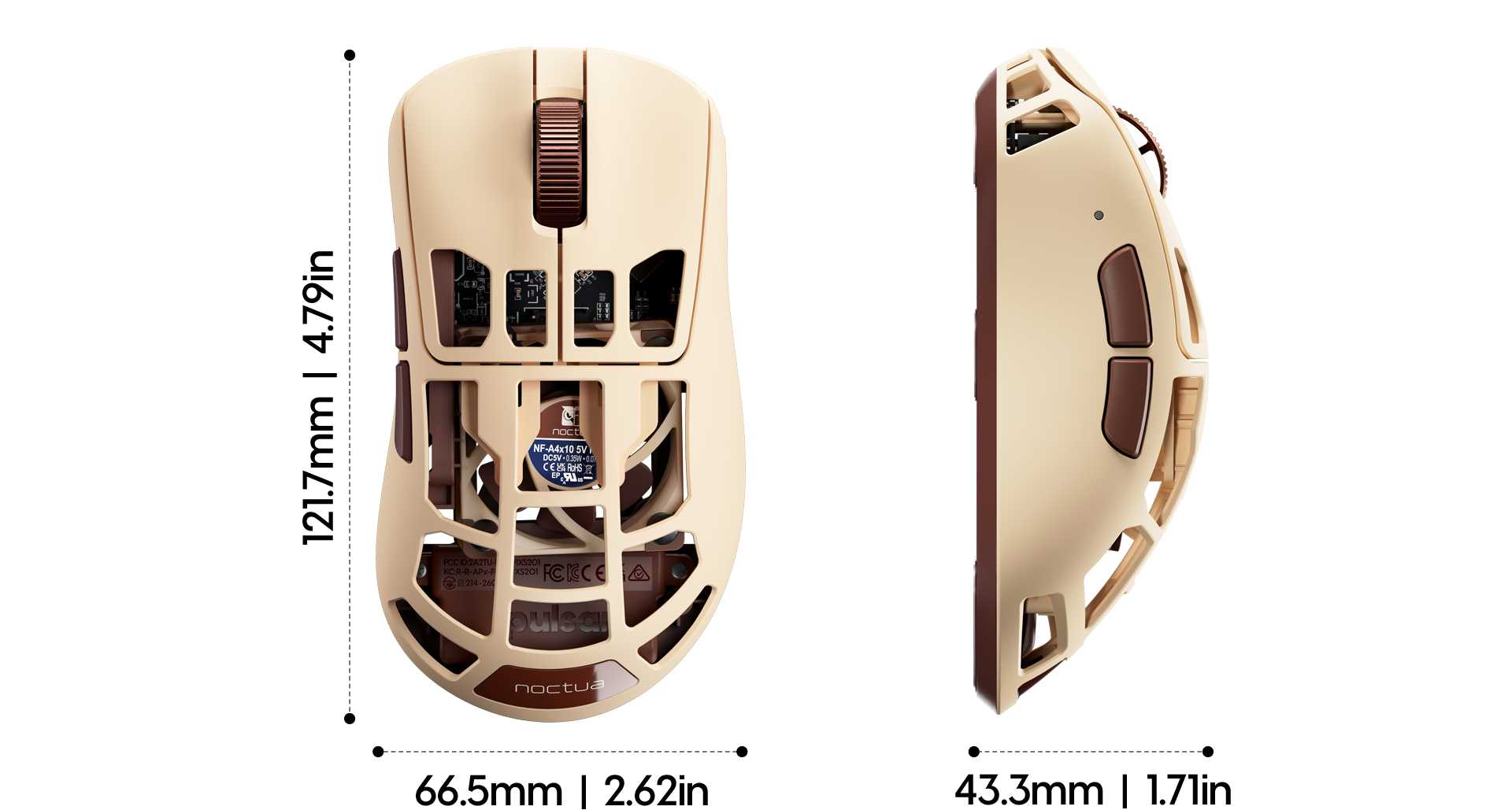
The star of the collaboration is a Noctua NF‑A4x10 5V PWM fan integrated beneath the perforated shell. Air is pushed through the chassis and out of the top grid, cooling your palm to reduce sweat and preserve grip over long sessions.
Fan speed can be adjusted on the fly: toggle it directly on the mouse with a side‑button/scroll combo, or use the Link 8K receiver to step between airflow levels. Prefer silence? You can turn the fan off entirely whenever you want.

Sensor and speed: built for flicks
Pulsar’s XS‑2 flagship sensor underpins the F01 Noctua Edition with 42,000 DPI, 800 IPS tracking speed, and 70G acceleration headroom. Those specs target flawless tracking under rapid flicks and fast micro‑corrections, the kinds of moves that separate good from great in FPS.
Pair that with up to 8,000 Hz polling (0.125 ms report interval) and you get eight times the data rate of standard 1,000 Hz mice. The result is cleaner motion data and lower input latency—useful on high‑refresh displays and in precision‑aim scenarios.
A Quick Explanation
Polling rate is how often the mouse reports movement to your PC. At 8,000 Hz, it reports every 0.125 ms. This can smooth out micro‑stutter and reduce latency, but it also increases USB and CPU load compared with 1,000 or 4,000 Hz.
Build, shape, and switches
The F01 Noctua Edition uses a carbon‑composite shell with a perforated top to vent air while keeping weight in check. It’s a medium‑size, right‑hand shape: 121.7 × 66.5 × 43.3 mm, and just 73 g ±2 g including the integrated cooling system and 500 mAh battery.
Pulsar’s optical switches are rated for 100 million clicks and are designed to avoid debounce delays and double‑click issues. A metal scroll wheel and Pulsar’s Blue encoder complete the feel, aiming for crisp, durable inputs.
For PC Gamers
If you play on 240–540 Hz monitors and chase sub‑frame latency, 8K polling can help preserve input nuance. If you’re on 120–165 Hz, try 2K–4K first—often the sweet spot between responsiveness, battery life, and CPU load.
The practical side: setup and daily use
The Link 8K receiver needs a USB 3.0 port and a modern CPU for 8K mode. You can still use 125/250/500/1K/2K/4K modes if your system can’t sustain 8K reliably. Pulsar’s web‑based Bibimbap software lets you customize DPI steps, LOD, macros, and fan behavior without installing drivers.
Because real airflow is involved, occasional cleaning will keep vents clear. The fan can be disabled when you’re not gaming to stretch runtime, then ramped up for long, sweaty scrims or hot rooms.
Things to Keep in Mind
Higher polling rates and active cooling both draw more power. If you need maximum battery life, run a lower polling mode with the fan off for general desktop use, then re‑enable performance settings before matches.
Who is it for?
This mouse makes the most sense for FPS and competitive players who value a consistent, dry grip and the lowest possible latency. It’s also appealing if your setup runs warm or if your hands tend to sweat during marathon sessions.
If you prefer a sealed shell or play casually at lower refresh rates, the design still works with the fan off and a standard polling mode. Either way, the price positions it among premium options with a unique thermal twist.
For PC Users
Place the receiver on a front USB 3.0 port for best 8K stability. Start at 4K polling, test your games, and step up to 8K if your CPU and USB bus keep frame times steady. Experiment with the fan’s levels to balance airflow and noise.
As a concept turned shipping product, this Pulsar x Noctua collab is both practical and a little playful. It’s a serious tool for hot summers and endurance grinds, with specs that match its eye‑catching design and a clear, premium value proposition at US$179.95.
Image credit: Pulsar Gaming Gears


